
Our Short List of 3
All 5 Picks at a Glance
| Product | Specs | Action |
|---|---|---|
 Petrosoft All-in-One SmartPOS-129 POS Bundle | Check price on Amazon | |
 Petrosoft All-in-One SmartPOS NX POS Bundle | Check price on Amazon | |
 MEETSUN POS Cash Register SET02 | Check price on Amazon | |
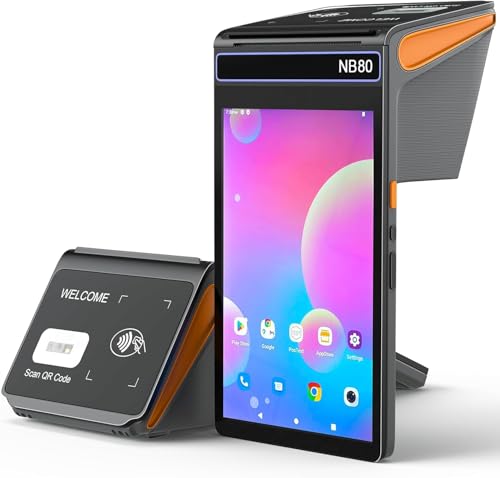 Symcode 4G and WiFi POS Terminal | Check price on Amazon | |
 Volcora Retail and Restaurant POS Terminal | Check price on Amazon |
Key takeaways
- Five touchscreen POS terminals compared by screen size, operating system and how each one handles receipt printing, from bundled and built-in printers to port-connected support.
Disclosure: As an Amazon Associate, we earn from qualifying purchases.
Our top pick: Petrosoft All-in-One SmartPOS-129 POS Bundle. Runner-up: Petrosoft All-in-One SmartPOS NX POS Bundle.
A touchscreen point of sale terminal earns its place on a counter only if the whole transaction flows through it smoothly, and printing a receipt is part of that flow rather than an afterthought. The five terminals in this guide all pair a touchscreen with receipt printer support, but they handle printing in different ways, and that difference matters most when choosing one. Two arrive as bundles with a separate thermal receipt printer in the box. Two more have a thermal printer built into the terminal itself. The fifth is a hardware-only terminal that connects to a receipt printer through its peripheral ports, with no printer included. Each model was checked against a real Amazon US listing, and its specs come from that listing.
That split shapes everything about ownership. A bundled printer can be replaced on its own if it fails, and it usually prints on wider paper than a built-in unit. A built-in printer removes cables and counter clutter. A port-connected terminal lets the owner choose a printer separately, but the printer is then an extra purchase and an extra compatibility question.
Quick Picks
- Petrosoft All-in-One SmartPOS-129 POS Bundle — Best complete counter bundle: 15-inch cashier screen, second 15-inch customer display, bundled RP80 printer, cash drawer and scanner.
- Petrosoft All-in-One SmartPOS NX POS Bundle — Best Linux-based bundle: 15.6-inch screen, customer-facing VFD display, Wi-Fi, and the same bundled RP80 printer arrangement.
- MEETSUN POS Cash Register SET02 — Best built-in printer design: 15-inch Windows terminal with a 58mm thermal printer inside the unit and an 11.6-inch customer display.
- Symcode 4G and WiFi POS Terminal — Best portable option: 8-inch handheld Android terminal with a built-in receipt and label printer, scanner and NFC.
- Volcora Retail and Restaurant POS Terminal — Best hardware-only terminal: 15.6-inch Windows 11 Pro terminal whose serial and USB ports connect to a printer bought separately.
Petrosoft All-in-One SmartPOS-129 POS Bundle
OUR TOP PICK
The SmartPOS-129 is the most complete counter package in this guide, and it takes the top spot because everything a small shop needs for a fixed checkout arrives together. As stated on the listing, the bundle pairs a 15-inch cashier touch screen at 1024 by 768 with a second 15-inch customer-facing display, so the person paying sees the transaction on a full-size screen of their own. The receipt printer is a separate bundled unit: the RP80 thermal printer, with a 2.8-inch print width and an auto-cutter, described on the listing as plug-and-play with the terminal.
Alongside the printer, the bundle includes a cash drawer and a 2D barcode scanner, so the counter can handle priced goods, cash and printed receipts from one purchase. The separate printer is a practical advantage: thermal printers are wear items in busy shops, and as its own unit it can be swapped or serviced without touching the terminal itself. The wider 2.8-inch print width also gives receipts more room per line than the narrower built-in printers further down this guide.
The trade-off is counter space and cabling: a terminal, a second display, a separate printer, a drawer and a scanner take up a real footprint. This bundle suits a fixed checkout, such as a convenience store, a small grocery or a cafe counter. Shops that need to carry the terminal to the customer should look at the handheld below.
Specs
– Model: Petrosoft All-in-One SmartPOS-129 POS Bundle
– Cashier screen: 15-inch touch screen, 1024 x 768, as stated on the listing
– Customer display: 15-inch customer-facing display, as stated on the listing
– Receipt printer: RP80 thermal printer bundled, 2.8-inch print width, auto-cutter, plug-and-play with the terminal
– Also included: cash drawer and 2D barcode scanner, as stated on the listing
Pros
– Complete bundle with terminal, second display, printer, cash drawer and scanner
– Separate RP80 printer with auto-cutter can be replaced without replacing the terminal
– Full-size 15-inch customer display rather than a small pole display
Cons
– Largest counter footprint in this guide, with several separate units to place and cable
– Fixed counter design, not suited to carrying around a shop floor
Petrosoft All-in-One SmartPOS NX POS Bundle
The SmartPOS NX follows the same bundle logic as the SmartPOS-129 but changes the terminal at the centre of it, which is why it sits as the runner-up. As stated on the listing, it is built around a 15.6-inch touch screen terminal running Linux, with a customer-facing VFD display rather than a second full screen, and it is described as a Wi-Fi POS system. The printer arrangement matches its sibling: the RP80 thermal receipt printer is bundled, with a cash drawer and a wireless barcode scanner.
The differences from the 129 decide which Petrosoft bundle fits which shop. The NX has the slightly larger main screen, which helps when the point of sale software shows dense grids of product buttons. Its customer display is a VFD type, the character display format long used at checkouts; it shows prices and totals clearly, but it cannot show the itemised layout the 129’s full second screen can. The wireless scanner frees staff from a cable when scanning larger items, and Wi-Fi gives more freedom in counter placement.
The Linux operating system is the other point to consider honestly. A Linux-based terminal is typically supplied as a matched system with its point of sale software, which suits owners who want that arrangement. Owners who already run a specific Windows point of sale application should check compatibility first. Like the 129, it is a fixed-counter system.
Specs
– Model: Petrosoft All-in-One SmartPOS NX POS Bundle
– Screen: 15.6-inch touch screen, as stated on the listing
– Customer display: customer-facing VFD display, as stated on the listing
– Operating system: Linux, as stated on the listing
– Receipt printer: RP80 thermal receipt printer bundled
– Also included: cash drawer and wireless barcode scanner, as stated on the listing
– Connectivity: Wi-Fi, as stated on the listing
Pros
– Larger 15.6-inch main screen for button-heavy point of sale layouts
– Bundled RP80 printer, cash drawer and wireless scanner in one package
– Wi-Fi connectivity gives freedom in counter placement
Cons
– VFD customer display shows figures only, not a full second screen
– Linux operating system means checking point of sale software compatibility first
MEETSUN POS Cash Register SET02
The SET02 takes the second approach to receipt printing in this guide: the printer is built into the terminal. As stated on the listing, this is a 15-inch full-flat touch screen Windows PC running Windows 10, with an 11.6-inch customer display and a built-in thermal receipt printer that takes 2 and a quarter inch, or 58mm, receipt paper. The listing describes an Intel Core i5 class processor with 8GB of memory and a 128GB solid state drive, making it a natural fit for Windows point of sale software.
A built-in printer changes the daily experience of a till in small but real ways. There is one unit on the counter instead of two, one power connection, and no printer cable to work loose. For a compact counter in a small cafe, salon, bakery or boutique, that tidiness is often the deciding factor. The customer display is a genuine second screen at 11.6 inches, smaller than the SmartPOS-129’s second display but still a screen.
The honest limitations follow from the same design. A 58mm receipt is narrower than the output of the bundled RP80 printers above, so long product names wrap sooner. If the built-in printer fails, the whole terminal is out of action while it is repaired, whereas a separate printer can simply be exchanged.
Specs
– Model: MEETSUN POS Cash Register SET02
– Screen: 15-inch full-flat touch screen, as stated on the listing
– Operating system: Windows 10, as stated on the listing
– Customer display: 11.6-inch customer display, as stated on the listing
– Receipt printer: built-in thermal printer for 2.25-inch (58mm) paper, as stated on the listing
– Processor and memory: Intel Core i5 class processor, 8GB RAM, 128GB SSD, as stated on the listing
Pros
– Built-in printer means one unit, one power connection and no printer cable
– Windows 10 with an i5 class processor suits common Windows point of sale software
– Genuine second screen for the customer at 11.6 inches
Cons
– Narrower 58mm receipts than the bundled printers in this guide
– A printer fault takes the whole terminal out of service
Symcode 4G and WiFi POS Terminal
The Symcode terminal is the different shape in this guide, included because it answers a question the countertop systems cannot: what if the till needs to move. As stated on the listing, it is a handheld terminal with an 8-inch touchscreen, running Android 12 on an octa-core SC9863 processor at 1.6GHz, with 3GB of memory and 16GB of storage. The screen is an IPS panel at 800 by 1280 with five-point touch. The receipt printer is built in, a 58mm unit printing at 90mm per second that handles both receipts and labels, and the terminal also carries a 2D barcode scanner and NFC. Connectivity is by 4G and Wi-Fi.
That combination makes it a genuinely self-contained mobile till. A market trader, a food truck or a restaurant team taking orders at the table can scan an item, take a contactless payment through NFC and print the receipt from one device held in one hand. Label printing suits market and deli use, where a price or weight label may be needed alongside the receipt, and 4G keeps the terminal online at outdoor pitches.
The compromises are the ones any handheld brings. An 8-inch screen shows less at once than a 15-inch counter terminal, so long menus take more scrolling. Memory and storage, at 3GB and 16GB, are sized for a point of sale application rather than wider software. Shops with a fixed till point will be better served by the countertop models above.
Specs
– Model: Symcode 4G and WiFi POS Terminal
– Screen: 8-inch IPS touchscreen, 800 x 1280, five-point touch, as stated on the listing
– Operating system: Android 12, as stated on the listing
– Processor and memory: octa-core SC9863 at 1.6GHz, 3GB RAM, 16GB storage, as stated on the listing
– Receipt printer: built-in 58mm receipt and label printer, 90mm per second, as stated on the listing
– Also built in: 2D barcode scanner and NFC, as stated on the listing
– Connectivity: 4G and Wi-Fi, as stated on the listing
Pros
– Fully portable till with printer, scanner and NFC in one handheld unit
– 4G connectivity keeps it online away from premises Wi-Fi
– Prints labels as well as receipts, useful for market and deli counters
Cons
– 8-inch screen shows less of a menu or product grid at once
– Modest memory and storage sized for a point of sale app, not wider software
Volcora Retail and Restaurant POS Terminal
The Volcora terminal represents the third approach in this guide, and it needs the clearest explanation: this is a hardware-only terminal, and no receipt printer is included with it. As stated on the listing, it is a 15.6-inch capacitive touchscreen terminal, model 530022, running Windows 11 Professional, with an Intel Core i5 processor, 4GB of memory and 128GB of storage. Its receipt printer support comes from its ports: two serial ports, four USB ports, HDMI and Ethernet. Volcora states that its terminals connect to receipt printers, scanners and cash drawers, so the owner buys the printer separately and connects it through those ports.
That arrangement suits a particular kind of buyer. A shop or restaurant that already owns a receipt printer it trusts, or that wants a specific model for kitchen or counter use, can keep that printer and build the new terminal around it. Serial ports still matter here, because much established point of sale hardware uses serial connections, and having both serial and USB available widens the range of printers and drawers that can be attached.
The caution is equally clear. The terminal alone is not the whole cost of a working till, because the printer, and any scanner or drawer not already owned, are separate purchases. Compatibility becomes the owner’s job: the printer chosen must work with the terminal’s ports and with the point of sale software in use. Buyers who want everything matched in one box should choose a bundle above.
Specs
– Model: Volcora Retail and Restaurant POS Terminal, model 530022
– Screen: 15.6-inch capacitive touchscreen, as stated on the listing
– Operating system: Windows 11 Professional, as stated on the listing
– Processor and memory: Intel Core i5, 4GB RAM, 128GB storage, as stated on the listing
– Ports: 2 serial ports, 4 USB ports, HDMI, Ethernet, as stated on the listing
– Receipt printer: not included; support is via the peripheral ports above, as stated for this terminal
Pros
– Serial and USB ports connect a wide range of existing printers, scanners and drawers
– Windows 11 Professional with a 15.6-inch capacitive touchscreen
– Lets a business keep a receipt printer it already owns and trusts
Cons
– No receipt printer included, so a working till costs more than the terminal alone
– Printer compatibility is the buyer’s responsibility to check
How to Choose
Begin with the printer question, because it divides this guide into three groups. If a shop wants a complete counter in one purchase, the two Petrosoft bundles include the RP80 thermal printer, a cash drawer and a scanner. If counter space is tight and tidiness matters more than receipt width, the MEETSUN SET02 and the Symcode handheld build the printer into the unit. If a business already owns a printer it wants to keep, the Volcora connects to it through serial or USB ports, but includes no printer of its own.
Next, think about receipt width. The bundled RP80 printers print at a 2.8-inch width, while the built-in printers in the SET02 and the Symcode use 58mm paper. A grocery shop printing long item names will feel that difference on every transaction. A coffee counter printing a short receipt may never notice it.
Then consider the operating system. The SET02 runs Windows 10, the Volcora runs Windows 11 Professional, the SmartPOS NX runs Linux and the Symcode runs Android 12. Point of sale software is usually written for one of these, so terminal and software should be chosen together, and an existing software requirement should lead the hardware choice.
Screen size and customer display come after that. A 15-inch or 15.6-inch main screen suits button grids and itemised bills at a fixed counter, while the Symcode’s 8-inch screen trades that view for portability. For the customer side, the SmartPOS-129 gives a full 15-inch second screen, the SET02 an 11.6-inch screen, and the SmartPOS NX a VFD display showing prices and totals.
Finally, plan for the day something fails. A separate bundled printer can be exchanged in minutes while the terminal keeps working. A built-in printer failure takes the whole unit out of service.
FAQs
Is a receipt printer included with every terminal in this guide?
No. The two Petrosoft bundles include the RP80 thermal receipt printer in the box. The MEETSUN SET02 and the Symcode handheld have a 58mm thermal printer built into the terminal. The Volcora terminal includes no printer at all; it supports one through its serial and USB ports, and the printer is bought separately.
Which terminal suits a business that sells away from a fixed counter?
The Symcode handheld is the only model here designed to move. It combines an 8-inch Android touchscreen, a built-in receipt and label printer, a 2D scanner and NFC in one unit, and its 4G connection keeps it online at market pitches, food trucks and other temporary sites.
What should a shop check before connecting an existing printer to the Volcora terminal?
Two things. First, the connection: the terminal provides two serial ports and four USB ports, so the existing printer needs to match one of those. Second, the software: the point of sale application running on Windows 11 Professional must support that printer model. Checking both before purchase avoids a terminal that powers up but cannot print.
Conclusion
For most fixed counters, the Petrosoft SmartPOS-129 is the top pick: a 15-inch cashier screen, a full-size customer display and a complete bundle with the RP80 receipt printer, cash drawer and scanner. The SmartPOS NX is the runner-up for shops that prefer its larger screen, Linux system, Wi-Fi and wireless scanner. The MEETSUN SET02 suits compact counters that want the printer built in under Windows, the Symcode handheld serves businesses that trade away from a fixed till point, and the Volcora fits owners who already have a printer to keep. Decide the printer arrangement first, then match the operating system to the point of sale software.
More from Amazon
Programs that pair well with the guide above. Offers and eligibility are set by Amazon and may change.
Set up recurring deliveries of everyday items on eligible products. Terms and savings are set by Amazon.
Explore Subscribe & SaveCollect the home and kitchen items you want in one registry that guests can shop from.
Create a wedding registryFree shipping on eligible items, Prime Video and more. Eligible new members can start with a free trial.
Start a Prime free trialAudiobooks and podcasts to listen to on the go. Eligible new members can start with a free trial.
Try Audible freeAs an Amazon Associate we earn from qualifying purchases.







Write Your Review
No reviews yet. Be the first to share your experience!