

Key takeaways
- Compare genuine touchscreen mobile workstations for virtual machines, with 64GB RAM, HX and H-series CPUs, and pro graphics from Lenovo and HP.
Running virtual machines is one of the fastest ways to find the limits of a laptop. Every guest operating system needs its own share of memory, its own virtual processors, and its own slice of disk, and all of that has to come out of whatever the host machine has installed. A laptop that feels quick with a browser and a few documents can feel completely different once two or three virtual machines are running at the same time, each with a desktop, a browser, and a set of services of its own.
A mobile workstation is the class of laptop built for exactly that kind of sustained load. Workstation lines such as Lenovo’s ThinkPad P series and HP’s ZBook family pair high-core-count H-series or HX-series processors with professional NVIDIA RTX Ada Generation graphics, certified drivers for professional software, and memory configurations that go well beyond what consumer laptops offer. They are also built to hold that performance under long, heavy workloads rather than short bursts.
Adding a touchscreen narrows the field dramatically, and it is important to be honest about that from the start. Most mobile workstations are sold with non-touch displays, and on several of the best-known workstation lines the touch panel is a single specific option — usually a high-resolution OLED panel — rather than something available across the range. That means the genuine shortlist of touchscreen mobile workstations with real virtual machine headroom on Amazon US is short. This guide covers two machines that meet the full brief, explains what to check on each listing, and is upfront about where the niche runs out.
As an Amazon Associate we earn from qualifying purchases.
What Virtual Machines Actually Need From a Workstation
Before looking at individual machines, it helps to be clear about which specifications matter for virtualization, because they are not quite the same as the specifications that matter for gaming or general creative work.
Memory comes first. Each running virtual machine reserves the memory you assign to it, and the host operating system needs memory of its own on top of that. A single lightweight Linux guest might be comfortable with a modest allocation, but a Windows guest running a full desktop and business applications will want a much larger share, and running two or three guests at once adds up quickly. This is why 64GB of RAM is the practical target for a workstation bought specifically for virtual machines: it lets you run several guests concurrently without constantly shutting one down to start another. A 32GB machine can handle a lighter setup — one main guest alongside the host, for example — but it leaves far less room to grow.
Processor cores come second. Virtual machines share the host’s physical cores, so a processor with more cores and threads gives you more to divide up. The HX-series and H-series Intel processors used in the workstations below offer core counts that consumer ultrabook chips do not approach, and that headroom is what keeps the host responsive while guests are busy. Hardware virtualization support is standard on these workstation-class processors, and Windows 11 Pro — the operating system on both machines here — is the edition that includes Microsoft’s built-in Hyper-V platform, alongside support for other common hypervisors.
Storage matters more than people expect. Virtual disk images are large files, and a guest operating system reading and writing its virtual disk at the same time as the host is doing its own work puts real pressure on the drive. Fast NVMe solid-state storage, and enough of it, keeps guests from feeling sluggish. A 1TB drive is workable if your virtual machine library is small; 2TB gives a much more comfortable home for multiple guest images and snapshots.
The professional GPU is mostly a bonus for this workload. Day-to-day virtual machines do not lean heavily on the discrete graphics card, but the professional RTX Ada Generation GPUs in these workstations matter if any of your guests run CAD, 3D, or other graphics-accelerated professional software, and they make the same machine genuinely capable for workstation tasks outside the hypervisor as well.
The touchscreen is about how you interact, not how guests perform. Touch does not make a virtual machine faster. What it does is change how you work at the host level and, where the hypervisor passes touch input through, inside guests that support it: tapping through a kiosk-style guest interface, annotating, presenting, or testing touch-driven software in a virtual environment. If you are developing or checking software that people will use with touch, having a real touchscreen on the host workstation is a practical advantage rather than a novelty.
The Picks
1. Lenovo ThinkPad P1 Gen 6 — OLED Touch With 64GB of RAM

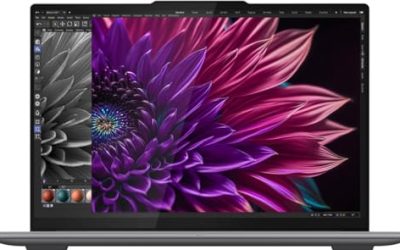
The Lenovo ThinkPad P1 Gen 6 is Lenovo’s thin-and-light entry in the ThinkPad P series, and the P series is Lenovo’s genuine mobile workstation line — this is not a consumer laptop with a workstation badge. The configuration in this listing is the one that fits the virtual machine brief: it pairs the 16-inch WQUXGA (3840 x 2400) OLED touchscreen with 64GB of DDR5 memory and a 1TB SSD.
The processor is an Intel Core i7-13800H with vPro, a 13th-generation H-series chip that the listing notes runs its performance cores up to 5.20 GHz. For virtualization, that combination of a high core count and 64GB of memory is the heart of the machine’s appeal: there is enough RAM to give more than one guest a generous allocation at the same time while leaving the host comfortable, and enough processor headroom that those guests are not fighting over a handful of cores.
Graphics in this configuration come from an NVIDIA GeForce RTX 4080 Laptop GPU with 12GB of GDDR6 memory. It is worth being precise here: this particular configuration uses a GeForce card rather than one of Lenovo’s professional RTX Ada options, which the P1 Gen 6 line also offers in other configurations. The machine itself is a genuine mobile workstation — the P1 is sold and supported as one, with the workstation positioning, build, and professional software certification story that goes with the line — but if your work specifically depends on certified professional graphics drivers inside a guest or on the host, check the graphics configuration on the listing carefully and consider whether the professional-GPU pick below suits you better. For straightforward virtual machine hosting, the RTX 4080 configuration has more than enough graphics power, and the 64GB of memory is the specification doing the real work.
The display deserves its own mention because it is the reason this configuration qualifies at all. The listing describes a 16-inch OLED panel at 3840 x 2400 with touch, Dolby Vision, 100% DCI-P3 coverage, and 400 nits of brightness, with an anti-reflection and anti-smudge coating — a sensible coating choice on a panel you will actually be touching. The listing also notes a fingerprint reader, a backlit keyboard, Intel Wi-Fi 6E, and Bluetooth 5.3, and the machine runs Windows 11 Pro, which keeps Hyper-V available out of the box.
For virtual machine use, the honest summary is this: the storage is the tightest part of the specification. A 1TB SSD fills up faster than expected once several guest images and their snapshots accumulate, so plan your virtual disk sizes deliberately. On memory, processor, display, and operating system, this configuration is a complete match for the brief.
2. HP ZBook Fury 16 G11 — The Most Storage Room, With a Panel Warning

The HP ZBook Fury 16 G11 is the flagship end of HP’s ZBook mobile workstation family, and on core specifications it is the roomiest machine here. This listing (model A6UN0UT#ABA) pairs an Intel Core i9-13950HX processor — a 24-core HX-series chip — with 64GB of DDR5 memory and a 2TB SSD, running Windows 11 Pro. That 2TB drive is a genuine practical advantage for virtualization: guest images, snapshots, and suspended machine states consume space steadily, and doubling the storage removes the most common capacity worry in this guide.
The display in this listing is a 16-inch WQUXGA (3840 x 2400) panel, and the listing’s own product details describe a capacitive touch screen type. Graphics are listed as NVIDIA RTX 4000 Ada Generation with 12GB of graphics memory — professional workstation graphics, consistent with the Fury’s position as HP’s most powerful mobile workstation line, and well matched to buyers who want one machine for both virtual machine hosting and demanding professional graphics work.
The panel warning, stated plainly: the ZBook Fury 16 G11 is sold in both touch and non-touch configurations at this same resolution. HP’s own specifications for the Fury line list a WQUXGA OLED touch option alongside non-touch WQUXGA panels, which means the model name and resolution alone do not guarantee touch. This listing describes the touch version, but because configurations sit so close together, confirm the touch field on the listing itself before ordering, and if the listing you land on does not clearly state a touchscreen, treat it as the non-touch configuration and look at the other pick instead. With that check done, the Fury’s combination of HX processor, 64GB of memory, 2TB of storage, and professional graphics is as strong a virtual machine host as this category offers.
How to Choose Between Them
Both machines share the fundamentals that matter most for virtual machines: 64GB of RAM, Windows 11 Pro, fast NVMe storage, and processors with core counts that leave room for several guests at once. The differences are in the details around that shared core.
Choose the ThinkPad P1 Gen 6 if portability matters alongside power. It is the slimmer, lighter style of workstation, its OLED touchscreen is confirmed directly in the listing’s own description, and its H-series processor still provides plenty of cores for a multi-guest setup. Accept the GeForce graphics configuration for what it is — very powerful, but not the professional-driver option — and watch the 1TB drive as your guest library grows.
Choose the ZBook Fury 16 G11 if storage, processor headroom, and all-round capacity lead your list. Its 24-core HX-series processor and professional RTX Ada graphics make it the most traditional workstation of the two, and it doubles the ThinkPad’s internal storage, which is the specification virtual machine users run out of first. Just do the panel check described above, because the Fury line’s touch and non-touch versions are easy to confuse.
An Honest Note on How Small This Category Is
It would be easy to pad a guide like this to five or more products, and it would not be honest. Touchscreen mobile workstations are a narrow niche within a niche. Surveying the major workstation lines shows the pattern clearly: several powerful workstations are sold only with non-touch displays, so they do not appear here despite their specifications. Several ZBook and ThinkPad configurations with otherwise suitable processors and memory ship with non-touch panels. Reseller listings sometimes describe workstation models loosely, and the word touchscreen in a roundup or a comparison table is not a substitute for the display details on the actual product listing.
The two machines above are the ones where the listing data supports every part of the brief at once: a genuine mobile workstation from a recognized workstation line, a touchscreen confirmed in the listing details, at least 64GB of memory in the configuration linked, and a processor with the cores to divide among guests. If your needs are lighter — one guest at a time, or no need for professional graphics — stepping down to a 32GB workstation configuration widens the field, but for running virtual machines seriously, the memory in these configurations is the point.
Buying Checks Before You Order
Workstation listings reward careful reading, because the same model name covers very different machines. Before ordering any of the picks above, work through these checks on the specific listing in front of you.
First, confirm the display line says touch. On every workstation line in this guide, touch is one panel option among several, and it is the easiest specification to lose when a seller’s configuration changes.
Second, confirm the memory figure in the listing’s own product details, not just the model family’s maximum. Workstation families advertise high maximum capacities, but what matters for your virtual machines is the RAM installed in the configuration you are actually buying.
Third, confirm the processor model. The difference between an HX-series chip, an H-series chip, and a low-power U-series chip is the difference between a workstation that hosts several guests comfortably and one that does not, and all three appear across the wider laptop market under similar-looking product names.
Fourth, check the installed operating system edition. Windows 11 Pro is what you want for built-in Hyper-V support and business management features, and it is what both listings here include.
Finally, think through your virtual machine plan before choosing storage. Estimate how many guests you will keep, how large each virtual disk will grow, and whether you will keep snapshots, then let that total — rather than the base specification — tell you whether 1TB is enough or the 2TB Fury configuration is the safer buy.
Conclusion
For virtual machines, the winning formula in a laptop is unglamorous: lots of memory, lots of cores, fast and spacious storage, and a professional operating system. The touchscreen requirement is what makes this particular shortlist short, because so few genuine mobile workstations offer one. The Lenovo ThinkPad P1 Gen 6 brings that combination in the most portable form, while the HP ZBook Fury 16 G11 pairs a 24-core HX processor and professional graphics with the most storage of the two, with a panel detail worth double-checking at checkout. Either of the two will host multiple virtual machines in a way no consumer laptop with a touchscreen can match — because neither of them is a consumer laptop at all.
More from Amazon
Programs that pair well with the guide above. Offers and eligibility are set by Amazon and may change.
Set up recurring deliveries of everyday items on eligible products. Terms and savings are set by Amazon.
Explore Subscribe & SaveCollect the home and kitchen items you want in one registry that guests can shop from.
Create a wedding registryFree shipping on eligible items, Prime Video and more. Eligible new members can start with a free trial.
Start a Prime free trialAudiobooks and podcasts to listen to on the go. Eligible new members can start with a free trial.
Try Audible freeAs an Amazon Associate we earn from qualifying purchases.









Write Your Review
No reviews yet. Be the first to share your experience!