

Key takeaways
- Compare the best 6-bay NAS enclosures for virtual machine storage, with 10GbE options, NVMe caching, iSCSI support, and VM-ready specs for home labs.
Running virtual machines from network storage changes what matters in a NAS. The best 6-bay NAS enclosures for virtual machine storage are built for that kind of workload: enough bays for a resilient array with room to grow, a processor and memory configuration that can handle virtualization duties, fast networking, and caching options that keep small random writes from becoming a bottleneck.
Six bays hit a practical sweet spot for a home lab or a small office. With six drive slots, you can build an array that tolerates one or even two drive failures while still leaving usable capacity for a handful of virtual machines, their virtual disks, snapshots, and backups. Fewer bays force uncomfortable compromises between redundancy and capacity, while larger rack units cost more, take up more space, and draw more power than most home labs need. A six-bay desktop unit sits on a shelf, stays quiet enough for an office, and still gives a virtualization host a serious block storage target over iSCSI or a fast file share over NFS and SMB.
This guide explains what to look for when choosing a six-bay NAS for virtual machine storage, then compares five enclosures that fit the job. Every unit here is diskless, so you choose your own drives, and every one supports the block and file protocols that hypervisors rely on.
How to Choose
1. Processor and Memory Headroom
Virtual machine storage is not a passive job. The NAS manages the file system, serves block storage, runs caching, handles snapshots, and often runs its own apps, containers, or virtual machines at the same time. A quad-core processor is a sensible minimum for this role, and more cores help when several guests issue input and output at once. Memory matters just as much. Look for at least 4 GB of RAM, with 8 GB or more preferred, and check whether the memory can be expanded.
2. Network Speed and Expansion
A single gigabit connection can become the ceiling for virtual machine performance long before the drives do. For virtual machine storage, look for 2.5 GbE ports at minimum, and give serious consideration to 10 GbE, either built in or available through a PCIe expansion slot. Dual network ports also allow link aggregation or a dedicated storage network, keeping virtual machine traffic separate from ordinary file sharing and streaming.
3. Drive Bays, Cache Slots, and RAID Flexibility
Six 3.5-inch bays are the baseline here, and support for 2.5-inch SSDs in those bays adds flexibility for an all-flash tier. Just as important are dedicated M.2 NVMe slots for SSD caching. A cache tier absorbs random writes and speeds up frequently read blocks, which is exactly the pattern virtual machines produce. Check how many M.2 slots the unit has and whether they can serve as a storage pool as well as a cache.
4. Virtualization Protocol Support
A NAS for virtual machines must speak the protocols your hypervisor uses. iSCSI is the standard choice for block storage presented directly to VMware ESXi, Microsoft Hyper-V, or Citrix Hypervisor, and it allows features such as thin provisioning and LUN snapshots. NFS is a common alternative for VMware datastores, while SMB works well for Hyper-V in many setups. Confirm that the NAS supports the protocol you plan to use, and look for vendor certifications or documented compatibility with your hypervisor.
5. Expandability and Maximum Capacity
Virtual machines accumulate data. Templates, snapshots, and backups grow quietly, and a six-bay unit that is full on day one leaves no room for that growth. Check the maximum supported drive size per bay and the total raw capacity the system allows, and confirm whether the unit supports an expansion enclosure for additional bays later.
6. Software Ecosystem and Management
The operating system on the NAS shapes the daily experience. A mature system with a clear web interface, scheduled snapshots, backup and replication tools, container support, and a built-in virtualization manager reduces the work of running a lab. Look for features such as SSD cache configuration, storage pool management, and alerts for drive health.
7. Noise, Power, and Build Quality
A six-bay NAS often lives in a home office or a small server corner, so acoustics and power draw deserve attention. Larger fans and a well-ventilated chassis generally run quieter than small, fast-spinning fans. Build quality matters too: tool-less drive trays, a sturdy metal chassis, and easy access to memory and cache slots make drive swaps and upgrades far less frustrating over the life of the unit.
Top Picks
Synology DiskStation DS1621+

The Synology DS1621+ is a well-established six-bay choice for virtual machine storage, and its combination of a capable processor, expandable memory, and a mature software platform makes it a strong fit for VMware and Hyper-V home labs. It runs on an AMD Ryzen V1500B quad-core processor running at 2.2 GHz, with 4 GB of DDR4 ECC memory installed and support for expansion up to 32 GB. That memory ceiling is generous for a desktop NAS and leaves plenty of room for caching, snapshots, and the storage services that sit behind a virtualization host.
Storage is handled by six 3.5-inch bays that accept 2.5-inch drives as well, plus two M.2 NVMe slots dedicated to SSD caching. The unit has four 1 GbE LAN ports that support link aggregation and failover, and a PCIe Gen3 x8 slot that accepts a 10 GbE network card or additional M.2 SSD adapters. Synology DiskStation Manager provides iSCSI LUNs with thin provisioning, NFS and SMB shares, scheduled snapshots through Snapshot Replication, and storage pool management with support for RAID 6 and Synology Hybrid RAID.
Who it is for: home lab owners and small offices running VMware or Hyper-V who want a proven platform, strong snapshot and backup tools, and a clear path to 10 GbE through the expansion slot.
Caveats: it ships diskless, so drives are a separate purchase, and 10 GbE requires an add-in card rather than being built in. The four LAN ports are gigabit only, so plan on the expansion card if your virtual machines need faster network throughput. Confirm that the expansion card you choose is on the vendor compatibility list before ordering.
QNAP TS-673A-8G

The QNAP TS-673A-8G pairs the same AMD Ryzen V1500B quad-core processor with more generous memory fitted as standard and stronger networking out of the box. It ships with 8 GB of DDR4 memory, expandable up to 64 GB, which gives it notable headroom for virtualization services, caching, and running containers or virtual machines directly on the NAS. Its six bays accept 3.5-inch and 2.5-inch SATA drives, and two M.2 NVMe PCIe Gen3 slots support SSD caching or Qtier automatic tiering, which moves hot data to faster storage without manual intervention.
Networking is a strength here: two 2.5 GbE ports are built in, and two PCIe Gen3 slots allow a 10 GbE or 5 GbE card, additional M.2 SSDs, or other expansion. QNAP supports iSCSI with thin provisioning, NFS, and SMB, and its Virtualization Station allows guests to run directly on the unit. The system runs QTS or QuTS hero, the latter with ZFS-based storage with stronger data integrity features for those who want them.
Who it is for: users who want faster networking without buying an add-in card first, generous memory headroom, and the flexibility of two PCIe slots for future expansion.
Caveats: it is diskless, so budget for drives separately, and the dual operating system choice means you should decide between QTS and QuTS hero before you build your first storage pool, since switching later requires rebuilding. The unit is a previous-generation model, so confirm current availability and support status with the seller before ordering.
UGREEN NASync DXP6800 Pro
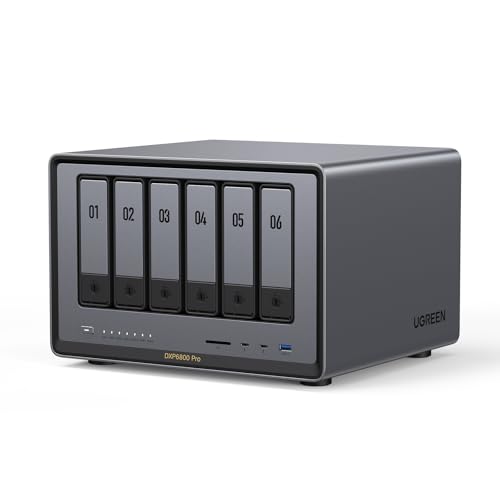
The UGREEN NASync DXP6800 Pro brings the fastest networking in this group to a six-bay desktop enclosure. It runs on an Intel Core i5-1235U processor with ten cores and twelve threads, paired with 8 GB of DDR5 memory expandable to 64 GB. That combination gives it ample processing power for virtual machine storage, containers, and services running alongside the storage workload. It has six SATA bays for 3.5-inch and 2.5-inch drives, two M.2 NVMe slots, a 128 GB SSD for the system, and a PCIe slot for further expansion.
Its networking is the headline: two 10 GbE ports are built in, alongside two Thunderbolt 4 ports and an 8K-capable HDMI output. Dual 10 GbE makes it easy to build a dedicated high-speed storage network for a virtualization host without buying an add-in card, and link aggregation or separate storage and management networks are straightforward.
Who it is for: home lab builders who already have 10 GbE switching, or who plan to build it, and who want the strongest processor and fastest built-in networking among these six-bay units.
Caveats: it ships diskless, so drives are an additional purchase, and UGOS is a newer platform than the established systems from Synology and QNAP, so its app ecosystem and third-party integrations are still maturing. Check that your hypervisor workflow, including iSCSI and snapshot handling, is supported in the current UGOS version before committing.
ASUSTOR Lockerstor 6 Gen2 AS6706T

ASUSTOR Lockerstor 6 Gen2 AS6706T
The ASUSTOR Lockerstor 6 Gen2 AS6706T stands out for its cache flexibility, with four M.2 NVMe slots in a six-bay desktop enclosure. It uses an Intel Celeron N5105 quad-core processor running at 2.0 GHz, with 8 GB of DDR4 memory installed. That processor handles file serving and iSCSI duties well, and the four M.2 slots allow a generous SSD cache or a dedicated high-speed pool for the virtual disks that see the heaviest random input and output, while the six SATA bays hold the bulk capacity.
Networking includes two 2.5 GbE ports, and a PCIe slot supports a 10 GbE card for faster host connectivity. The ADM operating system supports iSCSI LUNs, NFS, and SMB, along with scheduled snapshots, backup and replication tools, and virtual machines through VirtualBox.
Who it is for: users whose virtual machines generate heavy random input and output and who want more M.2 cache slots than competing units provide, without moving to a larger or louder enclosure.
Caveats: it is diskless, so drives are bought separately, and the Celeron processor has less headroom than the Ryzen or Core i5 chips in this group if you also plan to run many containers or virtual machines directly on the NAS. The 10 GbE upgrade requires an add-in card, so factor that into the plan if your host already runs at that speed.
TerraMaster T6-423

The TerraMaster T6-423 is a straightforward six-bay NAS aimed at small and medium business use, and its balanced specification sheet makes it a sensible entry point for a first virtual machine storage build. It runs on an Intel Celeron N5095 quad-core processor at 2.0 GHz, with 4 GB of DDR4 memory that can be expanded to 32 GB. Six bays accept 3.5-inch and 2.5-inch SATA drives, and two M.2 NVMe slots provide SSD caching to smooth out the random input and output that virtual machines generate.
Networking includes two 2.5 GbE ports, and the TOS 5 operating system supports iSCSI, NFS, and SMB, with storage pools, snapshots, and backup tools. The unit also has an HDMI output for direct display and USB ports for external backup drives.
Who it is for: first-time home lab builders and small offices that want a capable six-bay NAS for a modest number of virtual machines, with 2.5 GbE networking and NVMe caching at an accessible entry point.
Caveats: it ships diskless, so drives are a separate purchase, and the 4 GB of base memory is the lowest in this group, so plan a memory upgrade early if you run several virtual machines or enable heavy caching. There is no built-in 10 GbE, so faster networking depends on your switch and host setup or a future enclosure upgrade.
Comparison Table
| Feature | Synology DS1621+ | QNAP TS-673A-8G | UGREEN DXP6800 Pro | ASUSTOR AS6706T | TerraMaster T6-423 |
|---|---|---|---|---|---|
| Drive bays | 6 x 3.5-inch / 2.5-inch SATA | 6 x 3.5-inch / 2.5-inch SATA | 6 x SATA | 6 x 3.5-inch / 2.5-inch SATA | 6 x 3.5-inch / 2.5-inch SATA |
| Processor | AMD Ryzen V1500B quad-core, 2.2 GHz | AMD Ryzen V1500B quad-core, 2.2 GHz | Intel Core i5-1235U, 10 cores | Intel Celeron N5105 quad-core, 2.0 GHz | Intel Celeron N5095 quad-core, 2.0 GHz |
| Memory | 4 GB DDR4 ECC, up to 32 GB | 8 GB DDR4, up to 64 GB | 8 GB DDR5, up to 64 GB | 8 GB DDR4 | 4 GB DDR4, up to 32 GB |
| M.2 NVMe slots | 2 | 2 | 2 | 4 | 2 |
| Network ports | 4 x 1 GbE, PCIe slot for 10 GbE | 2 x 2.5 GbE, 2 x PCIe slots | 2 x 10 GbE, 2 x Thunderbolt 4 | 2 x 2.5 GbE, PCIe slot for 10 GbE | 2 x 2.5 GbE |
| iSCSI support | Yes | Yes | Yes | Yes | Yes |
| NFS and SMB support | Yes | Yes | Yes | Yes | Yes |
| Snapshot support | Yes | Yes | Yes | Yes | Yes |
| On-NAS virtual machines | Yes | Yes | Yes | Yes, via VirtualBox | Yes |
| Form factor | Desktop tower | Desktop tower | Desktop tower | Desktop tower | Desktop tower |
Which One Is Right for You?
Begin with your network, because it sets the ceiling for everything else. If your switch and virtualization host already run 10 GbE, the UGREEN DXP6800 Pro is the natural fit, since its dual 10 GbE ports and strong processor remove the network bottleneck from day one without an add-in card. If you run 2.5 GbE today and may move to 10 GbE later, the QNAP TS-673A-8G gives you fast built-in networking now and two PCIe slots for the upgrade path, along with the most generous memory ceiling in this group after the UGREEN.
If your priority is a mature software platform with deep snapshot, replication, and backup tooling, the Synology DS1621+ remains a strong choice for VMware and Hyper-V labs, provided you plan for a 10 GbE card through its PCIe slot. Its expandable ECC memory and established ecosystem make it a steady long-term host for virtual machine storage.
For workloads dominated by random input and output, such as several small guests writing logs and databases at once, the ASUSTOR AS6706T deserves a close look. Its four M.2 NVMe slots allow a larger cache or a dedicated flash pool than any other unit here, which can smooth out exactly the traffic pattern that slows virtual machines down. Finally, if you are building your first lab and want a capable six-bay unit with 2.5 GbE and NVMe caching at a more accessible entry point, the TerraMaster T6-423 covers the essentials, with a memory upgrade as the sensible first improvement.
Frequently Asked Questions
Is a six-bay NAS enough storage for virtual machines?
For most home labs and small offices, yes. Six bays allow an array with one or two drives of redundancy plus usable capacity for several virtual machines, templates, snapshots, and backups.
Should I use iSCSI or NFS for virtual machine storage?
Both work, and the right choice depends on your hypervisor. iSCSI presents block storage directly to the host and is the common choice for VMware, Hyper-V, and Citrix, with support for thin provisioning and LUN snapshots. NFS is widely used for VMware datastores and can be simpler to manage. All five enclosures in this guide support iSCSI, NFS, and SMB, so you can match the protocol to your host rather than to the NAS.
Do I need 10 GbE for virtual machine storage?
Not always, but it helps as soon as several virtual machines run at once. A single gigabit link can become a bottleneck during simultaneous boots or large transfers, while 2.5 GbE covers many small labs comfortably. If your host and switch support 10 GbE, choose an enclosure with built-in 10 GbE or a PCIe slot for a 10 GbE card so the network does not limit your drives.
Can I run virtual machines directly on the NAS itself?
Yes, most of these enclosures support containers or virtual machines running directly on the unit, which suits light services such as DNS, monitoring, or a small utility guest. For heavier guests, a dedicated host with the NAS as its storage target generally performs better, since the NAS processor and memory are shared with storage duties.
Disclosure: As an Amazon Associate, we may earn from qualifying purchases.
More from Amazon
Programs that pair well with the guide above. Offers and eligibility are set by Amazon and may change.
Set up recurring deliveries of everyday items on eligible products. Terms and savings are set by Amazon.
Explore Subscribe & SaveCollect the home and kitchen items you want in one registry that guests can shop from.
Create a wedding registryFree shipping on eligible items, Prime Video and more. Eligible new members can start with a free trial.
Start a Prime free trialAudiobooks and podcasts to listen to on the go. Eligible new members can start with a free trial.
Try Audible freeAs an Amazon Associate we earn from qualifying purchases.



Write Your Review
No reviews yet. Be the first to share your experience!