

Key takeaways
- Five rackmount NAS enclosures for virtual machine storage compared, from compact 4-bay 1U units to a 16-bay bundle, with CPU, RAM, ports and expansion.
A virtual machine host needs storage that stays online, serves many guests at once, and grows without a rebuild. A rackmount NAS enclosure gives a small lab or a growing office that kind of shared storage in a 1U or 2U box: the drives live in one place, the host reaches them over the network, and the enclosure handles redundancy, snapshots, and user access. The five enclosures in this guide were picked from their Amazon listings for rackmount form, real networking, and expansion room.
This guide is written for home-lab builders and small teams who run virtual machines on one or two hosts and want shared storage without a full server room. Every pick below is a rackmount enclosure — no desktop towers, no USB DAS boxes, no bare drives — and every specification comes from the Amazon listing itself. Read the How to Choose section first if you are unsure how many bays, how much RAM, or how fast a network link your guests need.
Quick Picks
As an Amazon Associate we earn from qualifying purchases
| Product | Best for | Key spec from title |
|---|---|---|
| Synology RackStation RS822+ | A compact 1U start for a small VM lab | 1U, 4-bay rackmount with AMD Ryzen V1500B |
| Synology RackStation RS1221+ | A short-depth 2U unit with room for eight drives | 2U, 8-bay rackmount with AMD Ryzen V1500B |
| QNAP TS-435XeU-4G-US | Fast networking on a short-depth 1U chassis | 1U, 4-bay rackmount with 10GbE SFP+ |
| QNAP TS-832PXU-4G-US | An 8-bay 2U unit with dual 10GbE links | 2U, 8-bay rackmount with dual 10GbE SFP+ |
| Synology RackStation RS4021xs+ Bundle | A large drive-populated setup with redundant power | 16-bay rackmount bundle with 64 GB DDR4 ECC |
How to Choose
Count the bays and the expansion path
Start with how many drives your virtual machines need today, then add room for the next two years. A 4-bay unit holds a small lab comfortably, while an 8-bay unit lets you add drives as guests multiply instead of replacing the whole box. Check whether the enclosure accepts an expansion unit: the RS822+ grows to eight drives with an RX418, which matters more than the bay count on day one. Also confirm the enclosure is diskless unless you want drives included — most picks here ship without drives, so budget for the disks separately and pick a RAID layout before you buy.
Match the CPU and RAM to the workload
A NAS that serves virtual machines does more than hold files: it runs the storage operating system, manages snapshots, and answers many small reads and writes at once. A quad-core processor such as the AMD Ryzen V1500B or the Marvell Octeon TX2 keeps that work moving, while the Xeon D-1541 in the largest pick here handles heavier multi-guest duty. RAM matters just as much. Two gigabytes is enough for a light lab, but caching and snapshots benefit from more — the RS822+ ships with 2 GB and expands to 32 GB, and several picks here ship with 4 GB. Match the memory to the number of guests you plan to run, not to the box alone.
Check the network links before the bays
The network link between the host and the NAS sets the ceiling for every guest, so read the port list before the bay count. Four 1GbE ports with failover keep a small lab running when one cable fails, and they are fine for light guests. Dual 2.5GbE or a 10GbE SFP+ link moves far more data and suits several guests running at once — both QNAP picks here carry 10GbE SFP+, and the TS-435XeU pairs it with dual 2.5GbE. If your switch has no 10GbE port, plan for one or accept the slower link. A PCIe slot, as on the RS1221+ and TS-832PXU, gives you a later upgrade path.
Measure the rack and the power plan
Rackmount means the box must fit your rack, not just your budget. A 1U unit slides into a shallow rack and leaves room above, while a 2U unit needs twice the height and usually more depth — the RS1221+ is short-depth at 298 mm, which helps in a compact rack. Check the weight too: the RS822+ is 18.7 lbs, light for a 1U box, while a drive-populated 16-bay bundle is far heavier once loaded. Finally, look at power: the RS4021xs+ bundle includes redundant power, which keeps guests online if one supply fails. For the other picks, plan the rack power and cooling before the drives arrive.
The 5 Best Options
Synology RackStation RS822+

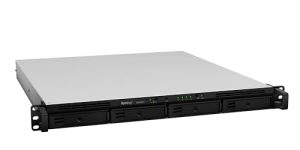
The RS822+ is the smallest rackmount pick here, and it suits a home lab that wants real NAS software in a 1U box. Its AMD Ryzen V1500B quad-core processor and four 1GbE ports with failover cover a handful of light guests, while sequential reads up to 2,103 MB/s keep shared images moving. Four bays hold the first set of drives, and the RX418 expansion unit grows the system to eight drives when the lab outgrows its first array. Optional SSD cache is available for readers who want faster random access later.
Specs
- 1U, 4-bay rackmount enclosure, diskless
- AMD Ryzen V1500B quad-core 2.2 GHz
- 2 GB DDR4 included, expandable to 32 GB
- 4 x 1GbE ports with failover and load balancing
- Up to 2,103 MB/s sequential read, 1,074 MB/s sequential write
- Expandable to 8 drives via RX418
- Optional SSD cache; Synology DSM; 18.7 lbs
Best for: A small home lab that needs a compact 1U NAS with room to grow.
Watch out for: The listing was verified through a catalog mirror, so re-check the /dp/ link in a regular browser before ordering; the included RAM is 2 GB, not 32 GB — 32 GB is the expansion ceiling.
Synology RackStation RS1221+

The RS1221+ doubles the bay count of the RS822+ while keeping the same Ryzen V1500B processor, which makes it a strong step up for a lab that already knows it will add drives. Eight bays hold a larger array, and the short 298 mm depth fits racks that a full-depth 2U box cannot. Two M.2 NVMe slots take SSD cache, the PCIe slot leaves room for a network upgrade, and Synology High Availability cluster support suits a team that wants a second unit to take over if the first fails. Four 1GbE ports handle the network side.
Specs
- 2U, 8-bay rackmount enclosure, diskless
- AMD Ryzen V1500B quad-core 2.2 GHz
- 4 GB DDR4
- Up to 2,315 MB/s sequential read, 1,147 MB/s sequential write
- Short depth 298 mm
- PCIe slot for network upgrades
- Synology High Availability cluster support
- 4 x 1GbE ports; 2 x M.2 NVMe slots
Best for: A growing lab that needs eight bays and a short-depth 2U chassis.
Watch out for: The listing was verified through a catalog mirror, so re-check the /dp/ link in a regular browser before ordering.
QNAP TS-435XeU-4G-US

The TS-435XeU is the networking pick of this guide: a short-depth 1U chassis with dual 2.5GbE ports and a 10GbE SFP+ link, which suits guests that move large images or run several virtual machines at once. Its Marvell Octeon TX2 quad-core processor runs at 2.2 GHz, and 4 GB of DDR4 expands to 32 GB for heavier caching. Two M.2 NVMe SSD slots take fast cache drives, and the diskless design lets you choose the exact drives for your array. Four bays keep the footprint small while the network stays fast.
Specs
- 1U short-depth, 4-bay rackmount enclosure, diskless
- Marvell Octeon TX2 quad-core 2.2 GHz
- 4 GB DDR4, expandable to 32 GB
- 2 x M.2 NVMe SSD slots
- Dual 2.5GbE + 10GbE SFP+ networking
Best for: A small lab that needs 10GbE networking in a compact 1U chassis.
Watch out for: The ASIN was matched through a catalog mirror, so re-check the /dp/ link in a regular browser before ordering; the bundle variant with four IronWolf 4TB drives is a different listing, not this diskless enclosure.
QNAP TS-832PXU-4G-US

The TS-832PXU pairs eight bays with the strongest network list in this guide: two 10GbE SFP+ ports plus two 2.5GbE ports, which suits a team running several guests that all read and write at once. Its AnnapurnaLabs Alpine AL324 quad-core processor runs at 1.7 GHz, and 4 GB of DDR4 expands to 16 GB. A PCIe Gen 2 x2 slot leaves room for a later card, and four USB 3.2 Gen 1 ports take external drives or a backup device. The 2U chassis holds a large array without demanding a deep rack.
Specs
- 2U, 8-bay rackmount enclosure, diskless
- AnnapurnaLabs Alpine AL324 quad-core 1.7 GHz
- 4 GB DDR4, expandable to 16 GB
- 2 x 10GbE SFP+ + 2 x 2.5GbE
- PCIe Gen 2 x2 expansion slot
- 4 x USB 3.2 Gen 1 ports
Best for: A team that needs eight bays with dual 10GbE links for several guests.
Watch out for: A catalog mirror shows this ASIN as out of stock, but the amazon.com store crawl showed Add to Cart — the mirror stock field looks stale, so confirm availability on the live /dp/ page before ordering.
Synology RackStation RS4021xs+ Bundle

The RS4021xs+ bundle is the largest pick here, and it arrives as a third-party bundle with drives and a rail kit already included — not as a bare diskless enclosure. Its Intel Xeon D-1541 eight-core processor and 64 GB of DDR4 ECC memory suit a busy host with many guests, while two 10GbE LAN ports keep the storage link fast. Redundant power keeps the unit running if one supply fails, and sixteen bays hold a very large array. The 352 TB figure in the listing describes the bundled drives, so read it as the bundle’s storage, not the enclosure alone.
Specs
- 16-bay rackmount enclosure, third-party bundle with drives and rail kit included
- Intel Xeon D-1541 8-core 2.1 GHz
- 64 GB DDR4 ECC
- 352 TB HDD storage (drives included in this bundle)
- 2 x 10GbE LAN ports
- Redundant power; Synology DSM; rail kit included
Best for: A busy setup that wants a large drive-populated 16-bay unit with redundant power.
Watch out for: This is a third-party bundle, not a bare diskless enclosure — the 352 TB figure covers the bundled drives, so confirm the bundle contents on the live listing before ordering.
Which One Fits Your Situation
You are building your first VM lab
Pick the RS822+ if your lab has one host and a handful of light guests. Its 1U size fits a small rack, the four 1GbE ports with failover keep the link up, and the RX418 expansion path lets you grow to eight drives later. Start with 2 GB of RAM and add memory when caching starts to matter.
You need fast networking for several guests
Choose the TS-435XeU if your guests move large images or run side by side. Its 10GbE SFP+ link and dual 2.5GbE ports move far more data than 1GbE, and the short-depth 1U chassis fits a compact rack. If you need eight bays as well, step up to the TS-832PXU for its dual 10GbE links.
Your rack is shallow or your team may add a second unit
Take the RS1221+ if depth is tight or high availability matters. Its 298 mm short depth fits racks that full-depth boxes cannot, the eight bays hold a larger array, and Synology High Availability cluster support lets a second unit take over if the first fails. The PCIe slot also leaves a network upgrade open.
You want the biggest setup, drives included
Go with the RS4021xs+ bundle if you want sixteen bays, drives, and a rail kit in one purchase. Its Xeon processor and 64 GB of ECC memory suit a busy host, redundant power keeps guests online through a supply failure, and dual 10GbE ports keep the link fast. Remember it is a third-party bundle, so confirm the contents on the live listing first.
Common Mistakes
- Buying a desktop tower or a USB DAS box when the rack needs a true rackmount NAS — check the form factor in the listing before ordering.
- Assuming the included RAM is the maximum: the RS822+ ships with 2 GB and expands to 32 GB, so read the included figure, not the ceiling.
- Treating a bundle’s drive total as the enclosure’s own capacity — the RS4021xs+ 352 TB figure covers the bundled drives.
- Ignoring the network link: four 1GbE ports suit a light lab, but several busy guests need 2.5GbE or 10GbE.
- Ordering a diskless enclosure without budgeting for drives — most picks here ship without disks, so plan the array and the drives together.
Frequently Asked Questions
Do I need 10GbE for virtual machine storage?
Not always. A small lab with one host and a few light guests runs fine on four 1GbE ports with failover, and the RS822+ covers that case. Move to 2.5GbE or 10GbE when several guests read and write at once or when large images move often. Both QNAP picks here carry 10GbE SFP+, so they suit busier setups.
Are these enclosures sold with drives included?
Four of the five are diskless, so you buy the drives separately and choose the array yourself. Only the RS4021xs+ listing is a third-party bundle with drives and a rail kit included, and its 352 TB figure describes those bundled drives. Check each listing’s contents before ordering so the box that arrives matches what you planned.
How much RAM does a NAS for virtual machines need?
It depends on the guest count and the caching you run. Two gigabytes covers a light lab, and the RS822+ ships with that amount while expanding to 32 GB. Four gigabytes, as on the RS1221+ and both QNAP picks, suits more guests and heavier snapshots. The RS4021xs+ bundle ships with 64 GB of ECC memory for the busiest setups here.
Can I expand the storage later without replacing the enclosure?
Yes, in most cases. The RS822+ grows from four drives to eight with an RX418 expansion unit, and the 8-bay and 16-bay picks hold larger arrays from the start. You can also add SSD cache through the M.2 slots on the RS1221+ and the TS-435XeU. Plan the RAID layout early, since changing it later takes more work.
More from Amazon
Programs that pair well with the guide above. Offers and eligibility are set by Amazon and may change.
Set up recurring deliveries of everyday items on eligible products. Terms and savings are set by Amazon.
Explore Subscribe & SaveCollect the home and kitchen items you want in one registry that guests can shop from.
Create a wedding registryFree shipping on eligible items, Prime Video and more. Eligible new members can start with a free trial.
Start a Prime free trialAudiobooks and podcasts to listen to on the go. Eligible new members can start with a free trial.
Try Audible freeAs an Amazon Associate we earn from qualifying purchases.



Write Your Review
No reviews yet. Be the first to share your experience!